
![[I support RFC 3023 t-shirt]](https://feedparser.org/img/feedparser.jpg)
You are here: Home ‣ Dive Into Python 3 ‣
Difficulty level: ♦♦♦♦♢
❝ A ruffled mind makes a restless pillow. ❞
— Charlotte Brontë
Philosophically, I can describe HTTP web services in 12 words: exchanging data with remote servers
using nothing but the operations of HTTP. If you want to get data from the server, use HTTP
GET. If you want to send new data to the server, use HTTP POST. Some
more advanced HTTP web service APIs also allow creating, modifying, and deleting
data, using HTTP PUT and HTTP DELETE. That’s it. No
registries, no envelopes, no wrappers, no tunneling. The “verbs” built into the HTTP
protocol (GET, POST, PUT, and DELETE) map directly to
application-level operations for retrieving, creating, modifying, and deleting data.
The main advantage of this approach is simplicity, and its simplicity has proven popular. Data — usually XML or JSON — can be built and stored statically, or generated dynamically by a server-side script, and all major programming languages (including Python, of course!) include an HTTP library for downloading it. Debugging is also easier; because each resource in an HTTP web service has a unique address (in the form of a URL), you can load it in your web browser and immediately see the raw data.
Examples of HTTP web services:
Python 3 comes with two different libraries for interacting with HTTP web services:
http.client is a
low-level library that implements RFC
2616, the HTTP protocol.
urllib.request is
an abstraction layer built on top of http.client. It provides a standard API
for accessing both HTTP and FTP servers, automatically follows HTTP
redirects, and handles some common forms of HTTP authentication.
So which one should you use? Neither of them. Instead, you should use
httplib2, an open source third-party library that implements HTTP more
fully than http.client but provides a better abstraction than urllib.request.
To understand why httplib2 is the right choice, you first need to understand HTTP.
⁂
There are five important features which all HTTP clients should support.
The most important thing to understand about any type of web service is that network access is incredibly expensive. I don’t mean “dollars and cents” expensive (although bandwidth ain’t free). I mean that it takes an extraordinary long time to open a connection, send a request, and retrieve a response from a remote server. Even on the fastest broadband connection, latency (the time it takes to send a request and start retrieving data in a response) can still be higher than you anticipated. A router misbehaves, a packet is dropped, an intermediate proxy is under attack — there’s never a dull moment on the public internet, and there may be nothing you can do about it.
HTTP is designed with caching in mind. There is an entire class of devices (called “caching proxies”) whose only job is to sit between you and the rest of the world and minimize network access. Your company or ISP almost certainly maintains caching proxies, even if you’re unaware of them. They work because caching is built into the HTTP protocol.
Here’s a concrete example of how caching works. You visit
diveintomark.org in your browser. That page includes a background
image, wearehugh.com/m.jpg. When
your browser downloads that image, the server includes the following HTTP
headers:
HTTP/1.1 200 OK
Date: Sun, 31 May 2009 17:14:04 GMT
Server: Apache
Last-Modified: Fri, 22 Aug 2008 04:28:16 GMT
ETag: "3075-ddc8d800"
Accept-Ranges: bytes
Content-Length: 12405
Cache-Control: max-age=31536000, public
Expires: Mon, 31 May 2010 17:14:04 GMT
Connection: close
Content-Type: image/jpeg
The Cache-Control and Expires headers tell your browser (and
any caching proxies between you and the server) that this image can be cached for up to
a year. A year! And if, in the next year, you visit another page which also
includes a link to this image, your browser will load the image from its cache without
generating any network activity whatsoever.
But wait, it gets better. Let’s say your browser purges the image from your
local cache for some reason. Maybe it ran out of disk space; maybe you manually
cleared the cache. Whatever. But the HTTP headers said that this data
could be cached by public caching proxies. (Technically, the important thing is what
the headers don’t say; the Cache-Control header
doesn’t have the private keyword, so this data is cacheable by
default.) Caching proxies are designed to have tons of storage space, probably far
more than your local browser has allocated.
If your company or ISP maintain a caching proxy, the proxy may still
have the image cached. When you visit diveintomark.org again, your
browser will look in its local cache for the image, but it won’t find it, so
it will make a network request to try to download it from the remote server. But if
the caching proxy still has a copy of the image, it will intercept that request and
serve the image from its cache. That means that your request will never
reach the remote server; in fact, it will never leave your company’s network.
That makes for a faster download (fewer network hops) and saves your company money
(less data being downloaded from the outside world).
HTTP caching only works when everybody does their part. On one side, servers need to send the correct headers in their response. On the other side, clients need to understand and respect those headers before they request the same data twice. The proxies in the middle are not a panacea; they can only be as smart as the servers and clients allow them to be.
Python’s HTTP libraries do not support caching, but httplib2
does.
Some data never changes, while other data changes all the time. In between, there is a vast field of data that might have changed, but hasn’t. CNN.com’s feed is updated every few minutes, but my weblog’s feed may not change for days or weeks at a time. In the latter case, I don’t want to tell clients to cache my feed for weeks at a time, because then when I do actually post something, people may not read it for weeks (because they’re respecting my cache headers which said “don’t bother checking this feed for weeks”). On the other hand, I don’t want clients downloading my entire feed once an hour if it hasn’t changed!
HTTP has a solution to this, too. When you request data for
the first time, the server can send back a Last-Modified
header. This is exactly what it sounds like: the date that the data was
changed. That background image referenced from diveintomark.org
included a Last-Modified header.
HTTP/1.1 200 OK
Date: Sun, 31 May 2009 17:14:04 GMT
Server: Apache
Last-Modified: Fri, 22 Aug 2008 04:28:16 GMT
ETag: "3075-ddc8d800"
Accept-Ranges: bytes
Content-Length: 12405
Cache-Control: max-age=31536000, public
Expires: Mon, 31 May 2010 17:14:04 GMT
Connection: close
Content-Type: image/jpeg
When you request the same data a second (or third or fourth) time, you
can send an If-Modified-Since header with your request, with
the date you got back from the server last time. If the data has changed
since then, then the server gives you the new data with a 200
status code. But if the data hasn’t changed since then,
the server sends back a special HTTP 304 status
code, which means “this data hasn’t changed since the last
time you asked for it.” You can test this on the command line,
using curl :
                                                you@localhost:~$ curl -I -H
                                                    "If-Modified-Since: Fri, 22 Aug 2008 04:28:16 GMT"
                                                  http://wearehugh.com/m.jpg
                                                HTTP/1.1 304 Not Modified
                                                  Date: Sun, 31 May 2009 18:04:39 GMT
                                                  Server: Apache
                                                  Connection: close
                                                  ETag: "3075-ddc8d800"
                                                  Expires: Mon, 31 May 2010 18:04:39 GMT
                                                  Cache-Control: max-age=31536000, public
Why is this an improvement? Because when the server sends a 304,
it doesn’t re-send the data. All you get is the status
code. Even after your cached copy has expired, last-modified checking
ensures that you won’t download the same data twice if it
hasn’t changed. (As an extra bonus, this 304 response
also includes caching headers. Proxies will keep a copy of data even
after it officially “expires,” in the hopes that the data
hasn’t really changed and the next request responds with a
304 status code and updated cache information.)
Python’s HTTP libraries do not support
last-modified date checking, but httplib2 does.
ETags are an alternate way to accomplish the same thing as the last-modified checking. With Etags, the
server sends a hash code in an ETag header along with
the data you requested. (Exactly how this hash is determined is
entirely up to the server. The only requirement is that it changes
when the data changes.) That background image referenced from diveintomark.org
had an ETag header.
HTTP/1.1 200 OK
Date: Sun, 31 May 2009 17:14:04 GMT
Server: Apache
Last-Modified: Fri, 22 Aug 2008 04:28:16 GMT
ETag: "3075-ddc8d800"
Accept-Ranges: bytes
Content-Length: 12405
Cache-Control: max-age=31536000, public
Expires: Mon, 31 May 2010 17:14:04 GMT
Connection: close
Content-Type: image/jpeg
The second time you request the same data, you include the ETag
hash in an If-None-Match header of your request. If
the data hasn’t changed, the server will send you back a
304 status code. As with the last-modified date
checking, the server sends back only the 304
status code; it doesn’t send you the same data a second time.
By including the ETag hash in your second request, you’re
telling the server that there’s no need to re-send the same
data if it still matches this hash, since you
still have the data from the last time.
Again with the curl:
you@localhost:~$ curl -I -H "If-None-Match: \"3075-ddc8d800\"" http://wearehugh.com/m.jpg  ①
HTTP/1.1 304 Not Modified
Date: Sun, 31 May 2009 18:04:39 GMT
Server: Apache
Connection: close
ETag: "3075-ddc8d800"
Expires: Mon, 31 May 2010 18:04:39 GMT
Cache-Control: max-age=31536000, public
If-None-Match header.
Python’s HTTP libraries do not support
ETags, but httplib2 does.
When you talk about HTTP web services, you’re almost always talking about moving text-based data back and forth over the wire. Maybe it’s XML, maybe it’s JSON, maybe it’s just plain text. Regardless of the format, text compresses well. The example feed in the XML chapter is 3070 bytes uncompressed, but would be 941 bytes after gzip compression. That’s just 30% of the original size!
HTTP supports several
compression algorithms. The two most common types are
gzip and
deflate .
When you request a resource over HTTP, you
can ask the server to send it in compressed format. You
include an Accept-encoding header in your
request that lists which compression algorithms you
support. If the server supports any of the same
algorithms, it will send you back compressed data (with a
Content-encoding header that tells you which
algorithm it used). Then it’s up to you to
decompress the data.
☞Important tip for server-side developers: make sure that the compressed version of a resource has a different Etag than the uncompressed version. Otherwise, caching proxies will get confused and may serve the compressed version to clients that can’t handle it. Read the discussion of Apache bug 39727 for more details on this subtle issue.
Python’s HTTP libraries do not
support compression, but httplib2 does.
Cool
URIs don’t change, but many
URIs are seriously uncool. Web sites get
reorganized, pages move to new addresses. Even web
services can reorganize. A syndicated feed at http://example.com/index.xml
might be moved to http://example.com/xml/atom.xml.
Or an entire domain might move, as an organization
expands and reorganizes; http://www.example.com/index.xml
becomes http://server-farm-1.example.com/index.xml.
Every time you request any kind of resource from
an HTTP server, the server includes a
status code in its response. Status code 200
means “everything’s normal,
here’s the page you asked for”. Status
code 404 means “page not
found”. (You’ve probably seen 404
errors while browsing the web.) Status codes in the
300’s indicate some form of redirection.
HTTP has several different ways of
signifying that a resource has moved. The two
most common techiques are status codes 302
and 301. Status code 302
is a temporary redirect; it means
“oops, that got moved over here
temporarily” (and then gives the temporary
address in a Location header).
Status code 301 is a permanent
redirect; it means “oops, that got
moved permanently” (and then gives the new
address in a Location header). If
you get a 302 status code and a new
address, the HTTP specification says
you should use the new address to get what you
asked for, but the next time you want to access
the same resource, you should retry the old
address. But if you get a 301 status
code and a new address, you’re supposed to
use the new address from then on.
The urllib.request module
automatically “follow” redirects
when it receives the appropriate status code
from the HTTP server, but it
doesn’t tell you that it did so.
You’ll end up getting data you asked for,
but you’ll never know that the underlying
library “helpfully” followed a
redirect for you. So you’ll continue
pounding away at the old address, and each time
you’ll get redirected to the new address,
and each time the urllib.request
module will “helpfully” follow the
redirect. In other words, it treats permanent
redirects the same as temporary redirects. That
means two round trips instead of one, which is
bad for the server and bad for you.
httplib2 handles permanent
redirects for you. Not only will it tell you
that a permanent redirect occurred, it will
keep track of them locally and automatically
rewrite redirected URLs before
requesting them.
⁂
Let’s say you want to download a resource over HTTP, such as an Atom feed. Being a feed, you’re not just going to download it once; you’re going to download it over and over again. (Most feed readers will check for changes once an hour.) Let’s do it the quick-and-dirty way first, and then see how you can do better.
>>> import urllib.request
>>> a_url = 'http://diveintopython3.org/examples/feed.xml'
>>> data = urllib.request.urlopen(a_url).read()  ①
>>> type(data)                                   ②
<class 'bytes'>
>>> print(data)
<?xml version='1.0' encoding='utf-8'?>
<feed xmlns='http://www.w3.org/2005/Atom' xml:lang='en'>
  <title>dive into mark</title>
  <subtitle>currently between addictions</subtitle>
  <id>tag:diveintomark.org,2001-07-29:/</id>
  <updated>2009-03-27T21:56:07Z</updated>
  <link rel='alternate' type='text/html' href='http://diveintomark.org/'/>
  …
urllib.request module
has a handy urlopen()
function that takes the address of
the page you want, and returns a
file-like object that you can just
read() from to get the
full contents of the page. It just
can’t get any easier.
urlopen().read()
method always returns a
bytes object, not a
string. Remember, bytes are
bytes; characters are an abstraction.
HTTP servers don’t
deal in abstractions. If you request
a resource, you get bytes. If you
want it as a string, you’ll
need to determine
the character encoding and
explicitly convert it to a string.
So what’s wrong with this? For a quick one-off during testing or development, there’s nothing wrong with it. I do it all the time. I wanted the contents of the feed, and I got the contents of the feed. The same technique works for any web page. But once you start thinking in terms of a web service that you want to access on a regular basis (e.g. requesting this feed once an hour), then you’re being inefficient, and you’re being rude.
⁂
To see why this is inefficient and rude, let’s turn on the debugging features of Python’s HTTP library and see what’s being sent “on the wire” (i.e. over the network).
>>> from http.client import HTTPConnection
>>> HTTPConnection.debuglevel = 1                                       ①
>>> from urllib.request import urlopen
>>> response = urlopen('http://diveintopython3.org/examples/feed.xml')  ②
send: b'GET /examples/feed.xml HTTP/1.1                                 ③
Host: diveintopython3.org                                               ④
Accept-Encoding: identity                                               ⑤
User-Agent: Python-urllib/3.1'                                          ⑥
Connection: close
reply: 'HTTP/1.1 200 OK'
…further debugging information omitted…
urllib.request
relies on another standard
Python library, http.client.
Normally you don’t
need to touch http.client
directly. (The urllib.request
module imports it
automatically.) But we
import it here so we can
toggle the debugging flag
on the HTTPConnection
class that urllib.request
uses to connect to the
HTTP server.
urllib.request
module sends five lines to
the server.
urllib.request
does not support
compression by
default.
Python-urllib
plus a version number. Both
urllib.request
and httplib2
support changing the user
agent, simply by adding a
User-Agent
header to the request
(which will override the
default value).
Now let’s look at what the server sent back in its response.
# continued from previous example
>>> print(response.headers.as_string())        ①
Date: Sun, 31 May 2009 19:23:06 GMT            ②
Server: Apache
Last-Modified: Sun, 31 May 2009 06:39:55 GMT   ③
ETag: "bfe-93d9c4c0"                           ④
Accept-Ranges: bytes
Content-Length: 3070                           ⑤
Cache-Control: max-age=86400                   ⑥
Expires: Mon, 01 Jun 2009 19:23:06 GMT
Vary: Accept-Encoding
Connection: close
Content-Type: application/xml
>>> data = response.read()                     ⑦
>>> len(data)
3070
urllib.request.urlopen()
function contains all the
HTTP headers
the server sent back. It
also contains methods to
download the actual data;
we’ll get to that
in a minute.
Last-Modified
header.
ETag
header.
Content-encoding
header. Your request
stated that you only
accept uncompressed data
(Accept-encoding:
identity), and
sure enough, this
response contains
uncompressed data.
response.read().
As you can tell from the
len()
function, this fetched a
total of 3070 bytes.
As you can see, this code is already inefficient: it asked for (and received) uncompressed data. I know for a fact that this server supports gzip compression, but HTTP compression is opt-in. We didn’t ask for it, so we didn’t get it. That means we’re fetching 3070 bytes when we could have fetched 941. Bad dog, no biscuit.
But wait, it gets worse! To see just how inefficient this code is, let’s request the same feed a second time.
# continued from the previous example
>>> response2 = urlopen('http://diveintopython3.org/examples/feed.xml')
send: b'GET /examples/feed.xml HTTP/1.1
Host: diveintopython3.org
Accept-Encoding: identity
User-Agent: Python-urllib/3.1'
Connection: close
reply: 'HTTP/1.1 200 OK'
…further debugging information omitted…
Notice anything
peculiar about this
request? It
hasn’t changed!
It’s exactly the
same as the first
request. No sign of If-Modified-Since
headers. No sign
of If-None-Match
headers. No
respect for the caching
headers. Still no
compression.
And what happens when you do the same thing twice? You get the same response. Twice.
# continued from the previous example
>>> print(response2.headers.as_string())     ①
Date: Mon, 01 Jun 2009 03:58:00 GMT
Server: Apache
Last-Modified: Sun, 31 May 2009 22:51:11 GMT
ETag: "bfe-255ef5c0"
Accept-Ranges: bytes
Content-Length: 3070
Cache-Control: max-age=86400
Expires: Tue, 02 Jun 2009 03:58:00 GMT
Vary: Accept-Encoding
Connection: close
Content-Type: application/xml
>>> data2 = response2.read()
>>> len(data2)                               ②
3070
>>> data2 == data                            ③
True
Cache-Control
and Expires
to allow caching,
Last-Modified
and ETag
to enable
“not-modified”
tracking. Even
the Vary:
Accept-Encoding
header hints that
the server would
support
compression, if
only you would
ask for it. But
you didn’t.
HTTP
is designed to work
better than this.
urllib
speaks HTTP
like I speak
Spanish — enough
to get by in a jam,
but not enough to
hold a
conversation. HTTP
is a conversation.
It’s time to
upgrade to a
library that speaks
HTTP
fluently.
⁂
httplib2Before you can
use httplib2,
you’ll
need to install
it. Visit
code.google.com/p/httplib2/
and download
the latest
version. httplib2
is available
for Python 2.x
and Python 3.x;
make sure you
get the Python
3 version,
named something
like httplib2-python3-0.5.0.zip.
Unzip the
archive, open
a terminal
window, and
go to the
newly created
httplib2
directory. On
Windows, open
the Start
menu, select
Run...,
type cmd.exe
and press
ENTER.
c:\Users\pilgrim\Downloads> dir
 Volume in drive C has no label.
 Volume Serial Number is DED5-B4F8

 Directory of c:\Users\pilgrim\Downloads

07/28/2009  12:36 PM    <DIR>          .
07/28/2009  12:36 PM    <DIR>          ..
07/28/2009  12:36 PM    <DIR>          httplib2-python3-0.5.0
07/28/2009  12:33 PM            18,997 httplib2-python3-0.5.0.zip
               1 File(s)         18,997 bytes
               3 Dir(s)  61,496,684,544 bytes free

c:\Users\pilgrim\Downloads> cd httplib2-python3-0.5.0
c:\Users\pilgrim\Downloads\httplib2-python3-0.5.0> c:\python31\python.exe setup.py install
running install
running build
running build_py
running install_lib
creating c:\python31\Lib\site-packages\httplib2
copying build\lib\httplib2\iri2uri.py -> c:\python31\Lib\site-packages\httplib2
copying build\lib\httplib2\__init__.py -> c:\python31\Lib\site-packages\httplib2
byte-compiling c:\python31\Lib\site-packages\httplib2\iri2uri.py to iri2uri.pyc
byte-compiling c:\python31\Lib\site-packages\httplib2\__init__.py to __init__.pyc
running install_egg_info
Writing c:\python31\Lib\site-packages\httplib2-python3_0.5.0-py3.1.egg-info
On Mac OS
X, run the
Terminal.app
application
in your
/Applications/Utilities/
folder. On
Linux, run
the Terminal
application,
which is
usually in
your Applications
menu under
Accessories
or System.
you@localhost:~/Desktop$ unzip httplib2-python3-0.5.0.zip
Archive:  httplib2-python3-0.5.0.zip
  inflating: httplib2-python3-0.5.0/README
  inflating: httplib2-python3-0.5.0/setup.py
  inflating: httplib2-python3-0.5.0/PKG-INFO
  inflating: httplib2-python3-0.5.0/httplib2/__init__.py
  inflating: httplib2-python3-0.5.0/httplib2/iri2uri.py
you@localhost:~/Desktop$ cd httplib2-python3-0.5.0/
you@localhost:~/Desktop/httplib2-python3-0.5.0$ sudo python3 setup.py install
running install
running build
running build_py
creating build
creating build/lib.linux-x86_64-3.1
creating build/lib.linux-x86_64-3.1/httplib2
copying httplib2/iri2uri.py -> build/lib.linux-x86_64-3.1/httplib2
copying httplib2/__init__.py -> build/lib.linux-x86_64-3.1/httplib2
running install_lib
creating /usr/local/lib/python3.1/dist-packages/httplib2
copying build/lib.linux-x86_64-3.1/httplib2/iri2uri.py -> /usr/local/lib/python3.1/dist-packages/httplib2
copying build/lib.linux-x86_64-3.1/httplib2/__init__.py -> /usr/local/lib/python3.1/dist-packages/httplib2
byte-compiling /usr/local/lib/python3.1/dist-packages/httplib2/iri2uri.py to iri2uri.pyc
byte-compiling /usr/local/lib/python3.1/dist-packages/httplib2/__init__.py to __init__.pyc
running install_egg_info
Writing /usr/local/lib/python3.1/dist-packages/httplib2-python3_0.5.0.egg-info
To use
httplib2,
create an
instance
of the
httplib2.Http
class.
>>> import httplib2
>>> h = httplib2.Http('.cache')                                                    ①
>>> response, content = h.request('http://diveintopython3.org/examples/feed.xml')  ②
>>> response.status                                                                ③
200
>>> content[:52]                                                                   ④
b"<?xml version='1.0' encoding='utf-8'?>\r\n<feed xmlns="
>>> len(content)
3070
httplib2
is
the
Http
object.
For
reasons
you’ll
see
in
the
next
section,
you
should
always
pass
a
directory
name
when
you
create
an
Http
object.
The
directory
does
not
need
to
exist;
httplib2
will
create
it if
necessary.
Http
object,
retrieving
data
is as
simple
as
calling
the
request()
method
with
the
address
of
the
data
you
want.
This
will
issue
an
HTTP
GET
request
for
that
URL.
(Later
in
this
chapter,
you’ll
see
how
to
issue
other
HTTP
requests,
like
POST.)
request()
method
returns
two
values.
The
first
is an
httplib2.Response
object,
which
contains
all
the
HTTP
headers
the
server
returned.
For
example,
a
status
code
of
200
indicates
that
the
request
was
successful.
bytes
object,
not
a
string.
If
you
want
it as
a
string,
you’ll
need
to determine
the
character
encoding
and
convert
it
yourself.
☞You probably only need one
httplib2.Httpobject. There are valid reasons for creating more than one, but you should only do so if you know why you need them. “I need to request data from two different URLs” is not a valid reason. Re-use theHttpobject and just call therequest()method twice.
httplib2
Returns
Bytes
Instead
of
StringsBytes.
Strings.
What
a
pain.
Why
can’t
httplib2
“just”
do
the
conversion
for
you?
Well,
it’s
complicated,
because
the
rules
for
determining
the
character
encoding
are
specific
to
what
kind
of
resource
you’re
requesting.
How
could
httplib2
know
what
kind
of
resource
you’re
requesting?
It’s
usually
listed
in
the
Content-Type
HTTP
header,
but
that’s
an
optional
feature
of
HTTP
and
not
all
HTTP
servers
include
it.
If
that
header
is
not
included
in
the
HTTP
response,
it’s
left
up
to
the
client
to
guess.
(This
is
commonly
called
“content
sniffing,”
and
it’s
never
perfect.)
If
you
know
what
sort
of
resource
you’re
expecting
(an
XML
document
in
this
case),
perhaps
you
could
“just”
pass
the
returned
bytes
object
to
the
xml.etree.ElementTree.parse()
function.
That’ll
work
as
long
as
the
XML
document
includes
information
on
its
own
character
encoding
(as
this
one
does),
but
that’s
an
optional
feature
and
not
all
XML
documents
do
that.
If
an
XML
document
doesn’t
include
encoding
information,
the
client
is
supposed
to
look
at
the
enclosing
transport — i.e.
the
Content-Type
HTTP
header,
which
can
include
a
charset
parameter.
But
it’s
worse
than
that.
Now
character
encoding
information
can
be
in
two
places:
within
the
XML
document
itself,
and
within
the
Content-Type
HTTP
header.
If
the
information
is
in
both
places,
which
one
wins?
According
to
RFC
3023
(I
swear
I
am
not
making
this
up),
if
the
media
type
given
in
the
Content-Type
HTTP
header
is
application/xml,
application/xml-dtd,
application/xml-external-parsed-entity,
or
any
one
of
the
subtypes
of
application/xml
such
as
application/atom+xml
or
application/rss+xml
or
even
application/rdf+xml,
then
the
encoding
is
charset
parameter
of
the
Content-Type
HTTP
header,
or
encoding
attribute
of
the
XML
declaration
within
the
document,
or
On
the
other
hand,
if
the
media
type
given
in
the
Content-Type
HTTP
header
is
text/xml,
text/xml-external-parsed-entity,
or
a
subtype
like
text/AnythingAtAll+xml,
then
the
encoding
attribute
of
the
XML
declaration
within
the
document
is
ignored
completely,
and
the
encoding
is
Content-Type
HTTP
header,
or
us-ascii
And that’s just for XML documents. For HTML documents, web browsers have constructed such byzantine rules for content-sniffing [PDF] that we’re still trying to figure them all out.
httplib2
Handles
CachingRemember
in
the
previous
section
when
I
said
you
should
always
create
an
httplib2.Http
object
with
a
directory
name?
Caching
is
the
reason.
# continued from the previous example
>>> response2, content2 = h.request('http://diveintopython3.org/examples/feed.xml')  ①
>>> response2.status                                                                 ②
200
>>> content2[:52]                                                                    ③
b"<?xml version='1.0' encoding='utf-8'?>\r\n<feed xmlns="
>>> len(content2)
3070
status
is
once
again
200,
just
like
last
time.
So… who cares? Quit your Python interactive shell and relaunch it with a new session, and I’ll show you.
# NOT continued from previous example!
# Please exit out of the interactive shell
# and launch a new one.
>>> import httplib2
>>> httplib2.debuglevel = 1                                                        ①
>>> h = httplib2.Http('.cache')                                                    ②
>>> response, content = h.request('http://diveintopython3.org/examples/feed.xml')  ③
>>> len(content)                                                                   ④
3070
>>> response.status                                                                ⑤
200
>>> response.fromcache                                                             ⑥
True
httplib2
equivalent
of
turning
on
debugging
in
http.client.
httplib2
will
print
all
the
data
being
sent
to
the
server
and
some
key
information
being
sent
back.
httplib2.Http
object
with
the
same
directory
name
as
before.
httplib2’s
local
cache.
That
directory
name
you
passed
in
when
you
created
the
httplib2.Http
object — that
directory
holds
httplib2’s
cache
of
all
the
operations
it’s
ever
performed.
☞If you want to turn on
httplib2debugging, you need to set a module-level constant (httplib2.debuglevel), then create a newhttplib2.Httpobject. If you want to turn off debugging, you need to change the same module-level constant, then create a newhttplib2.Httpobject.
You
previously
requested
the
data
at
this
URL.
That
request
was
successful
(status:
200).
That
response
included
not
only
the
feed
data,
but
also
a
set
of
caching
headers
that
told
anyone
who
was
listening
that
they
could
cache
this
resource
for
up
to
24
hours
(Cache-Control:
max-age=86400,
which
is
24
hours
measured
in
seconds).
httplib2
understand
and
respects
those
caching
headers,
and
it
stored
the
previous
response
in
the
.cache
directory
(which
you
passed
in
when
you
create
the
Http
object).
That
cache
hasn’t
expired
yet,
so
the
second
time
you
request
the
data
at
this
URL,
httplib2
simply
returns
the
cached
result
without
ever
hitting
the
network.
I
say
“simply,”
but
obviously
there
is
a
lot
of
complexity
hidden
behind
that
simplicity.
httplib2
handles
HTTP
caching
automatically
and
by
default.
If
for
some
reason
you
need
to
know
whether
a
response
came
from
the
cache,
you
can
check
response.fromcache.
Otherwise,
it
Just
Works.
Now, suppose you have data cached, but you want to bypass the cache and re-request it from the remote server. Browsers sometimes do this if the user specifically requests it. For example, pressing F5 refreshes the current page, but pressing Ctrl+F5 bypasses the cache and re-requests the current page from the remote server. You might think “oh, I’ll just delete the data from my local cache, then request it again.” You could do that, but remember that there may be more parties involved than just you and the remote server. What about those intermediate proxy servers? They’re completely beyond your control, and they may still have that data cached, and will happily return it to you because (as far as they are concerned) their cache is still valid.
Instead of manipulating your local cache and hoping for the best, you should use the features of HTTP to ensure that your request actually reaches the remote server.
# continued from the previous example
>>> response2, content2 = h.request('http://diveintopython3.org/examples/feed.xml',
...     headers={'cache-control':'no-cache'})  ①
connect: (diveintopython3.org, 80)             ②
send: b'GET /examples/feed.xml HTTP/1.1
Host: diveintopython3.org
user-agent: Python-httplib2/$Rev: 259 $
accept-encoding: deflate, gzip
cache-control: no-cache'
reply: 'HTTP/1.1 200 OK'
…further debugging information omitted…
>>> response2.status
200
>>> response2.fromcache                        ③
False
>>> print(dict(response2.items()))             ④
{'status': '200',
 'content-length': '3070',
 'content-location': 'http://diveintopython3.org/examples/feed.xml',
 'accept-ranges': 'bytes',
 'expires': 'Wed, 03 Jun 2009 00:40:26 GMT',
 'vary': 'Accept-Encoding',
 'server': 'Apache',
 'last-modified': 'Sun, 31 May 2009 22:51:11 GMT',
 'connection': 'close',
 '-content-encoding': 'gzip',
 'etag': '"bfe-255ef5c0"',
 'cache-control': 'max-age=86400',
 'date': 'Tue, 02 Jun 2009 00:40:26 GMT',
 'content-type': 'application/xml'}
httplib2
allows
you
to
add
arbitrary
HTTP
headers
to
any
outgoing
request.
In
order
to
bypass
all
caches
(not
just
your
local
disk
cache,
but
also
any
caching
proxies
between
you
and
the
remote
server),
add
a
no-cache
header
in
the
headers
dictionary.
httplib2
initiating
a
network
request.
httplib2
understands
and
respects
caching
headers
in
both
directions — as
part
of
the
incoming
response
and
as
part
of
the
outgoing
request.
It
noticed
that
you
added
the
no-cache
header,
so
it
bypassed
its
local
cache
altogether
and
then
had
no
choice
but
to
hit
the
network
to
request
the
data.
httplib2
uses
to
update
its
local
cache,
in
the
hopes
of
avoiding
network
access
the
next
time
you
request
this
feed.
Everything
about
HTTP
caching
is
designed
to
maximize
cache
hits
and
minimize
network
access.
Even
though
you
bypassed
the
cache
this
time,
the
remote
server
would
really
appreciate
it
if
you
would
cache
the
result
for
next
time.
httplib2
Handles
Last-Modified
and
ETag
HeadersThe
Cache-Control
and
Expires
caching
headers
are
called
freshness
indicators.
They
tell
caches
in
no
uncertain
terms
that
you
can
completely
avoid
all
network
access
until
the
cache
expires.
And
that’s
exactly
the
behavior
you
saw
in
the
previous
section:
given
a
freshness
indicator,
httplib2
does
not
generate
a
single
byte
of
network
activity
to
serve
up
cached
data
(unless
you
explicitly
bypass
the
cache,
of
course).
But
what
about
the
case
where
the
data
might
have
changed,
but
hasn’t?
HTTP
defines
Last-Modified
and
Etag
headers
for
this
purpose.
These
headers
are
called
validators.
If
the
local
cache
is
no
longer
fresh,
a
client
can
send
the
validators
with
the
next
request
to
see
if
the
data
has
actually
changed.
If
the
data
hasn’t
changed,
the
server
sends
back
a
304
status
code
and
no
data.
So
there’s
still
a
round-trip
over
the
network,
but
you
end
up
downloading
fewer
bytes.
>>> import httplib2
>>> httplib2.debuglevel = 1
>>> h = httplib2.Http('.cache')
>>> response, content = h.request('http://diveintopython3.org/')  ①
connect: (diveintopython3.org, 80)
send: b'GET / HTTP/1.1
Host: diveintopython3.org
accept-encoding: deflate, gzip
user-agent: Python-httplib2/$Rev: 259 $'
reply: 'HTTP/1.1 200 OK'
>>> print(dict(response.items()))                                 ②
{'-content-encoding': 'gzip',
 'accept-ranges': 'bytes',
 'connection': 'close',
 'content-length': '6657',
 'content-location': 'http://diveintopython3.org/',
 'content-type': 'text/html',
 'date': 'Tue, 02 Jun 2009 03:26:54 GMT',
 'etag': '"7f806d-1a01-9fb97900"',
 'last-modified': 'Tue, 02 Jun 2009 02:51:48 GMT',
 'server': 'Apache',
 'status': '200',
 'vary': 'Accept-Encoding,User-Agent'}
>>> len(content)                                                  ③
6657
httplib2
has
little
to
work
with,
and
it
sends
out
a
minimum
of
headers
with
the
request.
ETag
and
Last-Modified
header.
# continued from the previous example
>>> response, content = h.request('http://diveintopython3.org/')  ①
connect: (diveintopython3.org, 80)
send: b'GET / HTTP/1.1
Host: diveintopython3.org
if-none-match: "7f806d-1a01-9fb97900"                             ②
if-modified-since: Tue, 02 Jun 2009 02:51:48 GMT                  ③
accept-encoding: deflate, gzip
user-agent: Python-httplib2/$Rev: 259 $'
reply: 'HTTP/1.1 304 Not Modified'                                ④
>>> response.fromcache                                            ⑤
True
>>> response.status                                               ⑥
200
>>> response.dict['status']                                       ⑦
'304'
>>> len(content)                                                  ⑧
6657
Http
object
(and
the
same
local
cache).
httplib2
sends
the
ETag
validator
back
to
the
server
in
the
If-None-Match
header.
httplib2
also
sends
the
Last-Modified
validator
back
to
the
server
in
the
If-Modified-Since
header.
304
status
code
and
no
data.
httplib2
notices
the
304
status
code
and
loads
the
content
of
the
page
from
its
cache.
304
(returned
from
the
server
this
time,
which
caused
httplib2
to
look
in
its
cache),
and
200
(returned
from
the
server
last
time,
and
stored
in
httplib2’s
cache
along
with
the
page
data).
response.status
returns
the
status
from
the
cache.
response.dict,
which
is
a
dictionary
of
the
actual
headers
returned
from
the
server.
httplib2
is
smart
enough
to
let
you
act
dumb.)
By
the
time
the
request()
method
returns
to
the
caller,
httplib2
has
already
updated
its
cache
and
returned
the
data
to
you.
httplib2
Handles
CompressionHTTP
supports
several
types
of
compression;
the
two
most
common
types
are
gzip
and
deflate.
httplib2
supports
both
of
these.
>>> response, content = h.request('http://diveintopython3.org/')
connect: (diveintopython3.org, 80)
send: b'GET / HTTP/1.1
Host: diveintopython3.org
accept-encoding: deflate, gzip                          ①
user-agent: Python-httplib2/$Rev: 259 $'
reply: 'HTTP/1.1 200 OK'
>>> print(dict(response.items()))
{'-content-encoding': 'gzip',                           ②
 'accept-ranges': 'bytes',
 'connection': 'close',
 'content-length': '6657',
 'content-location': 'http://diveintopython3.org/',
 'content-type': 'text/html',
 'date': 'Tue, 02 Jun 2009 03:26:54 GMT',
 'etag': '"7f806d-1a01-9fb97900"',
 'last-modified': 'Tue, 02 Jun 2009 02:51:48 GMT',
 'server': 'Apache',
 'status': '304',
 'vary': 'Accept-Encoding,User-Agent'}
httplib2
sends
a
request,
it
includes
an
Accept-Encoding
header
to
tell
the
server
that
it
can
handle
either
deflate
or
gzip
compression.
request()
method
returns,
httplib2
has
already
decompressed
the
body
of
the
response
and
placed
it
in
the
content
variable.
If
you’re
curious
about
whether
or
not
the
response
was
compressed,
you
can
check
response['-content-encoding'];
otherwise,
don’t
worry
about
it.
httplib2
Handles
RedirectsHTTP
defines
two
kinds
of
redirects:
temporary
and
permanent.
There’s
nothing
special
to
do
with
temporary
redirects
except
follow
them,
which
httplib2
does
automatically.
>>> import httplib2
>>> httplib2.debuglevel = 1
>>> h = httplib2.Http('.cache')
>>> response, content = h.request('http://diveintopython3.org/examples/feed-302.xml')  ①
connect: (diveintopython3.org, 80)
send: b'GET /examples/feed-302.xml HTTP/1.1                                            ②
Host: diveintopython3.org
accept-encoding: deflate, gzip
user-agent: Python-httplib2/$Rev: 259 $'
reply: 'HTTP/1.1 302 Found'                                                            ③
send: b'GET /examples/feed.xml HTTP/1.1                                                ④
Host: diveintopython3.org
accept-encoding: deflate, gzip
user-agent: Python-httplib2/$Rev: 259 $'
reply: 'HTTP/1.1 200 OK'
302
                                                                                                                                                                    Found
.
Not
shown
here,
this
response
also
includes
a
Location
header
that
points
to
the
real
URL.
httplib2
immediately
turns
around
and
“follows”
the
redirect
by
issuing
another
request
for
the
URL
given
in
the
Location
header:
http://diveintopython3.org/examples/feed.xml
“Following”
a
redirect
is
nothing
more
than
this
example
shows.
httplib2
sends
a
request
for
the
URL
you
asked
for.
The
server
comes
back
with
a
response
that
says
“No
no,
look
over
there
instead.”
httplib2
sends
another
request
for
the
new
URL.
# continued from the previous example
>>> response                                                          ①
{'status': '200',
 'content-length': '3070',
 'content-location': 'http://diveintopython3.org/examples/feed.xml',  ②
 'accept-ranges': 'bytes',
 'expires': 'Thu, 04 Jun 2009 02:21:41 GMT',
 'vary': 'Accept-Encoding',
 'server': 'Apache',
 'last-modified': 'Wed, 03 Jun 2009 02:20:15 GMT',
 'connection': 'close',
 '-content-encoding': 'gzip',                                         ③
 'etag': '"bfe-4cbbf5c0"',
 'cache-control': 'max-age=86400',                                    ④
 'date': 'Wed, 03 Jun 2009 02:21:41 GMT',
 'content-type': 'application/xml'}
request()
method
is
the
response
from
the
final
URL.
httplib2
adds
the
final
URL
to
the
response
dictionary,
as
content-location.
This
is
not
a
header
that
came
from
the
server;
it’s
specific
to
httplib2.
The
response
you
get
back
gives
you
information
about
the
final
URL.
What
if
you
want
more
information
about
the
intermediate
URLs,
the
ones
that
eventually
redirected
to
the
final
URL?
httplib2
lets
you
do
that,
too.
# continued from the previous example
>>> response.previous                                                     ①
{'status': '302',
 'content-length': '228',
 'content-location': 'http://diveintopython3.org/examples/feed-302.xml',
 'expires': 'Thu, 04 Jun 2009 02:21:41 GMT',
 'server': 'Apache',
 'connection': 'close',
 'location': 'http://diveintopython3.org/examples/feed.xml',
 'cache-control': 'max-age=86400',
 'date': 'Wed, 03 Jun 2009 02:21:41 GMT',
 'content-type': 'text/html; charset=iso-8859-1'}
>>> type(response)                                                        ②
<class 'httplib2.Response'>
>>> type(response.previous)
<class 'httplib2.Response'>
>>> response.previous.previous                                            ③
>>>
httplib2
followed
to
get
to
the
current
response
object.
httplib2.Response
objects.
None.
What happens if you request the same URL again?
# continued from the previous example
>>> response2, content2 = h.request('http://diveintopython3.org/examples/feed-302.xml')  ①
connect: (diveintopython3.org, 80)
send: b'GET /examples/feed-302.xml HTTP/1.1                                              ②
Host: diveintopython3.org
accept-encoding: deflate, gzip
user-agent: Python-httplib2/$Rev: 259 $'
reply: 'HTTP/1.1 302 Found'                                                              ③
>>> content2 == content                                                                  ④
True
httplib2.Http
object
(and
therefore
the
same
cache).
302
response
was
not
cached,
so
httplib2
sends
another
request
for
the
same
URL.
302.
But
notice
what
didn’t
happen:
there
wasn’t
ever
a
second
request
for
the
final
URL,
http://diveintopython3.org/examples/feed.xml.
That
response
was
cached
(remember
the
Cache-Control
header
that
you
saw
in
the
previous
example).
Once
httplib2
received
the
302
                                                                                                                                                                          Found
code,
it
checked
its
cache
before
issuing
another
request.
The
cache
contained
a
fresh
copy
of
http://diveintopython3.org/examples/feed.xml,
so
there
was
no
need
to
re-request
it.
request()
method
returns,
it
has
read
the
feed
data
from
the
cache
and
returned
it.
Of
course,
it’s
the
same
as
the
data
you
received
last
time.
In
other
words,
you
don’t
have
to
do
anything
special
for
temporary
redirects.
httplib2
will
follow
them
automatically,
and
the
fact
that
one
URL
redirects
to
another
has
no
bearing
on
httplib2’s
support
for
compression,
caching,
ETags,
or
any
of
the
other
features
of
HTTP.
Permanent redirects are just as simple.
# continued from the previous example
>>> response, content = h.request('http://diveintopython3.org/examples/feed-301.xml')  ①
connect: (diveintopython3.org, 80)
send: b'GET /examples/feed-301.xml HTTP/1.1
Host: diveintopython3.org
accept-encoding: deflate, gzip
user-agent: Python-httplib2/$Rev: 259 $'
reply: 'HTTP/1.1 301 Moved Permanently'                                                ②
>>> response.fromcache                                                                 ③
True
http://diveintopython3.org/examples/feed.xml.
301.
But
again,
notice
what
didn’t
happen:
there
was
no
request
to
the
redirect
URL.
Why
not?
Because
it’s
already
cached
locally.
httplib2
“followed”
the
redirect
right
into
its
cache.
But wait! There’s more!
# continued from the previous example
>>> response2, content2 = h.request('http://diveintopython3.org/examples/feed-301.xml')  ①
>>> response2.fromcache                                                                  ②
True
>>> content2 == content                                                                  ③
True
httplib2
follows
a
permanent
redirect,
all
further
requests
for
that
URL
will
transparently
be
rewritten
to
the
target
URL
without
hitting
the
network
for
the
original
URL.
Remember,
debugging
is
still
turned
on,
yet
there
is
no
output
of
network
activity
whatsoever.
HTTP. It works.
⁂
HTTP
web
services
are
not
limited
to
GET
requests.
What
if
you
want
to
create
something
new?
Whenever
you
post
a
comment
on
a
discussion
forum,
update
your
weblog,
publish
your
status
on
a
microblogging
service
like
Twitter
or
Identi.ca
,
you’re
probably
already
using
HTTP
POST.
Both Twitter and Identi.ca both offer a simple HTTP-based API for publishing and updating your status in 140 characters or less. Let’s look at Identi.ca’s API documentation for updating your status:
Identi.ca REST API Method: statuses/update
Updates the authenticating user’s status. Requires thestatusparameter specified below. Request must be aPOST.
- URL
https://identi.ca/api/statuses/update.format- Formats
xml,json,rss,atom- HTTP Method(s)
POST- Requires Authentication
- true
- Parameters
status. Required. The text of your status update. URL-encode as necessary.
How
does
this
work?
To
publish
a
new
message
on
Identi.ca,
you
need
to
issue
an
HTTP
POST
request
to
http://identi.ca/api/statuses/update.format.
(The
format
bit
is
not
part
of
the
URL;
you
replace
it
with
the
data
format
you
want
the
server
to
return
in
response
to
your
request.
So
if
you
want
a
response
in
XML,
you
would
post
the
request
to
https://identi.ca/api/statuses/update.xml.)
The
request
needs
to
include
a
parameter
called
status,
which
contains
the
text
of
your
status
update.
And
the
request
needs
to
be
authenticated.
Authenticated?
Sure.
To
update
your
status
on
Identi.ca,
you
need
to
prove
who
you
are.
Identi.ca
is
not
a
wiki;
only
you
can
update
your
own
status.
Identi.ca
uses
HTTP
Basic
Authentication
(a.k.a.
RFC
2617)
over
SSL
to
provide
secure
but
easy-to-use
authentication.
httplib2
supports
both
SSL
and
HTTP
Basic
Authentication,
so
this
part
is
easy.
A
POST
request
is
different
from
a
GET
request,
because
it
includes
a
payload.
The
payload
is
the
data
you
want
to
send
to
the
server.
The
one
piece
of
data
that
this
API
method
requires
is
status,
and
it
should
be
URL-encoded.
This
is
a
very
simple
serialization
format
that
takes
a
set
of
key-value
pairs
(i.e.
a
dictionary)
and
transforms
it
into
a
string.
>>> from urllib.parse import urlencode              ①
>>> data = {'status': 'Test update from Python 3'}  ②
>>> urlencode(data)                                 ③
'status=Test+update+from+Python+3'
urllib.parse.urlencode().
status,
whose
value
is
the
text
of
a
single
status
update.
POST
request.
>>> from urllib.parse import urlencode
>>> import httplib2
>>> httplib2.debuglevel = 1
>>> h = httplib2.Http('.cache')
>>> data = {'status': 'Test update from Python 3'}
>>> h.add_credentials('diveintomark', 'MY_SECRET_PASSWORD', 'identi.ca')    ①
>>> resp, content = h.request('https://identi.ca/api/statuses/update.xml',
...     'POST',                                                             ②
...     urlencode(data),                                                    ③
...     headers={'Content-Type': 'application/x-www-form-urlencoded'})      ④
httplib2
handles
authentication.
Store
your
username
and
password
with
the
add_credentials()
method.
When
httplib2
tries
to
issue
the
request,
the
server
will
respond
with
a
401
                                                                                                                                                                                                    Unauthorized
status
code,
and
it
will
list
which
authentication
methods
it
supports
(in
the
WWW-Authenticate
header).
httplib2
will
automatically
construct
an
Authorization
header
and
re-request
the
URL.
POST.
☞The third parameter to the
add_credentials()method is the domain in which the credentials are valid. You should always specify this! If you leave out the domain and later reuse thehttplib2.Httpobject on a different authenticated site,httplib2might end up leaking one site’s username and password to the other site.
This is what goes over the wire:
# continued from the previous example
send: b'POST /api/statuses/update.xml HTTP/1.1
Host: identi.ca
Accept-Encoding: identity
Content-Length: 32
content-type: application/x-www-form-urlencoded
user-agent: Python-httplib2/$Rev: 259 $

status=Test+update+from+Python+3'
reply: 'HTTP/1.1 401 Unauthorized'                        ①
send: b'POST /api/statuses/update.xml HTTP/1.1            ②
Host: identi.ca
Accept-Encoding: identity
Content-Length: 32
content-type: application/x-www-form-urlencoded
authorization: Basic SECRET_HASH_CONSTRUCTED_BY_HTTPLIB2  ③
user-agent: Python-httplib2/$Rev: 259 $

status=Test+update+from+Python+3'
reply: 'HTTP/1.1 200 OK'                                  ④
401
                                                                                                                                                                                                      Unauthorized
status
code.
httplib2
will
never
send
authentication
headers
unless
the
server
explicitly
asks
for
them.
This
is
how
the
server
asks
for
them.
httplib2
immediately
turns
around
and
requests
the
same
URL
a
second
time.
add_credentials()
method.
What
does
the
server
send
back
after
a
successful
request?
That
depends
entirely
on
the
web
service
API.
In
some
protocols
(like
the
Atom
Publishing
Protocol),
the
server
sends
back
a
201
                                                                                                                                                                                                    Created
status
code
and
the
location
of
the
newly
created
resource
in
the
Location
header.
Identi.ca
sends
back
a
200
                                                                                                                                                                                                      OK
and
an
XML
document
containing
information
about
the
newly
created
resource.
# continued from the previous example
>>> print(content.decode('utf-8'))                             ①
<?xml version="1.0" encoding="UTF-8"?>
<status>
 <text>Test update from Python 3</text>                        ②
 <truncated>false</truncated>
 <created_at>Wed Jun 10 03:53:46 +0000 2009</created_at>
 <in_reply_to_status_id></in_reply_to_status_id>
 <source>api</source>
 <id>5131472</id>                                              ③
 <in_reply_to_user_id></in_reply_to_user_id>
 <in_reply_to_screen_name></in_reply_to_screen_name>
 <favorited>false</favorited>
 <user>
  <id>3212</id>
  <name>Mark Pilgrim</name>
  <screen_name>diveintomark</screen_name>
  <location>27502, US</location>
  <description>tech writer, husband, father</description>
  <profile_image_url>http://avatar.identi.ca/3212-48-20081216000626.png</profile_image_url>
  <url>http://diveintomark.org/</url>
  <protected>false</protected>
  <followers_count>329</followers_count>
  <profile_background_color></profile_background_color>
  <profile_text_color></profile_text_color>
  <profile_link_color></profile_link_color>
  <profile_sidebar_fill_color></profile_sidebar_fill_color>
  <profile_sidebar_border_color></profile_sidebar_border_color>
  <friends_count>2</friends_count>
  <created_at>Wed Jul 02 22:03:58 +0000 2008</created_at>
  <favourites_count>30768</favourites_count>
  <utc_offset>0</utc_offset>
  <time_zone>UTC</time_zone>
  <profile_background_image_url></profile_background_image_url>
  <profile_background_tile>false</profile_background_tile>
  <statuses_count>122</statuses_count>
  <following>false</following>
  <notifications>false</notifications>
</user>
</status>
httplib2
is
always
bytes,
not
a
string.
To
convert
it
to
a
string,
you
need
to
decode
it
using
the
proper
character
encoding.
Identi.ca’s
API
always
returns
results
in
UTF-8,
so
that
part
is
easy.
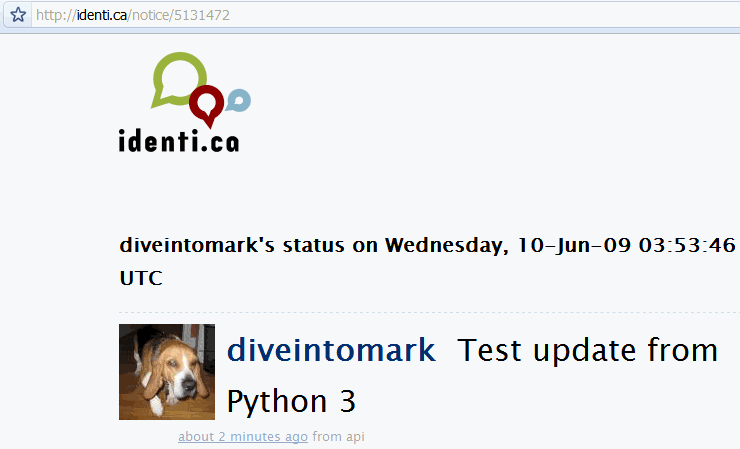
And here it is:
⁂
HTTP
isn’t
limited
to
GET
and
POST.
Those
are
certainly
the
most
common
types
of
requests,
especially
in
web
browsers.
But
web
service
APIs
can
go
beyond
GET
and
POST,
and
httplib2
is
ready.
# continued from the previous example
>>> from xml.etree import ElementTree as etree
>>> tree = etree.fromstring(content)                                          ①
>>> status_id = tree.findtext('id')                                           ②
>>> status_id
'5131472'
>>> url = 'https://identi.ca/api/statuses/destroy/{0}.xml'.format(status_id)  ③
>>> resp, deleted_content = h.request(url, 'DELETE')                          ④
findtext()
method
finds
the
first
instance
of
the
given
expression
and
extracts
its
text
content.
In
this
case,
we’re
just
looking
for
an
<id>
element.
<id>
element,
we
can
construct
a
URL
to
delete
the
status
message
we
just
published.
DELETE
request
to
that
URL.
This is what goes over the wire:
send: b'DELETE /api/statuses/destroy/5131472.xml HTTP/1.1      ①
Host: identi.ca
Accept-Encoding: identity
user-agent: Python-httplib2/$Rev: 259 $

'
reply: 'HTTP/1.1 401 Unauthorized'                             ②
send: b'DELETE /api/statuses/destroy/5131472.xml HTTP/1.1      ③
Host: identi.ca
Accept-Encoding: identity
authorization: Basic SECRET_HASH_CONSTRUCTED_BY_HTTPLIB2       ④
user-agent: Python-httplib2/$Rev: 259 $

'
reply: 'HTTP/1.1 200 OK'                                       ⑤
>>> resp.status
200
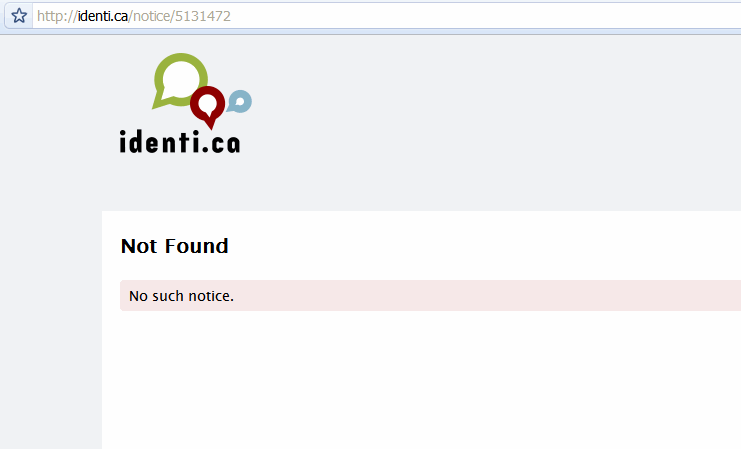
And just like that, poof, it’s gone.
⁂
httplib2:
httplib2
project
page
httplib2
code
examples
httplib2
httplib2:
HTTP
Persistence
and
Authentication
HTTP caching:
RFCs:
© 2001–11 Mark Pilgrim